Salesforce Release Update 5.0: Advisory Rep ID Requests & Drip Campaign Integrations
As the financial services industry continues to leverage technology to improve operational efficiency, GVA remains committed to enhancing our systems to reduce manual processes and streamline advisor requests. In this release, GVA is introducing a new Advisory Rep ID Request process powered by Salesforce, along with two new marketing integrations to support advisor drip campaign initiatives.
Advisory Rep ID Requests
GVA now offers a streamlined process for requesting new Advisory Rep IDs directly within Salesforce. This functionality, along with request status tracking, is available to all GVA Salesforce users.
To submit a request, navigate to the Rep ID tab in Salesforce and select New Rep ID Request. Users can provide:
- Rep ID split information
- Notes for the Operations Team
- Rep ID type designation (GVA Asset Management or Asset Based Pricing Self-Managed)
- Email address for trading notifications
- *For GVA Asset Management Rep IDs, the Investments Team email address will automatically populate as the trading notification recipient.
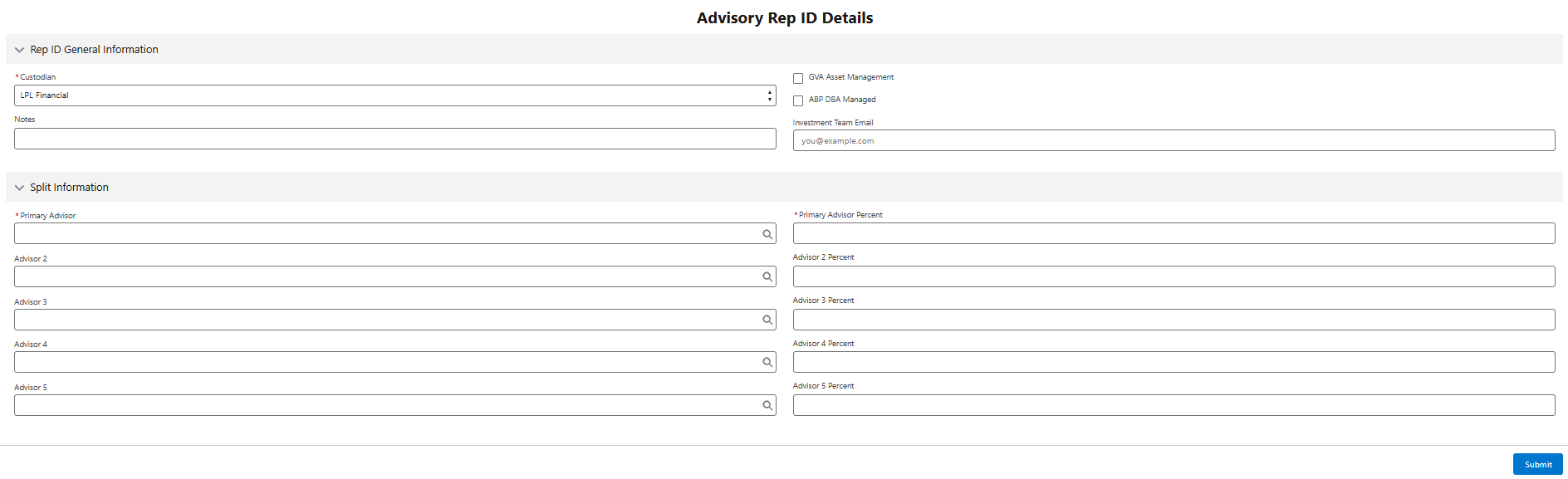
For GVA Asset Management Rep IDs, the Investments Team email address will automatically populate as the trading notification recipient.
Once submitted, GVA Operations will be notified and will begin the Rep ID creation process with the custodian. Throughout the process, the request status will be updated in Salesforce, and the record will be updated with the official Rep ID once it has been issued by the custodian.
If additional information is needed, the Operations Team will contact the user who submitted the request directly.
Drip Campaign Integrations
GVA is excited to announce new integrations with Constant Contact and FMG, providing advisors with additional tools to support client communication and marketing initiatives.
These integrations allow advisors to sync client data from Salesforce into Constant Contact or FMG and create automated email campaigns and ongoing client communication programs. Advisors can leverage these platforms to deliver targeted marketing content, educational materials, newsletters, and other client outreach initiatives.
Access to the Constant Contact and FMG integrations is available to users with a GVA Full Salesforce License. Please note that advisors must first establish an account with either Constant Contact or FMG and notify the GVA Salesforce Team. Once notified, the GVA Salesforce Team will configure the advisor’s Salesforce account and enable the appropriate integration.
What’s Included in the GVA Full Salesforce License?
Please refer to the attached PDF for a complete comparison of Salesforce license features. Additional information can also be found on the Salesforce Intranet page.
Have Questions?
Please contact salesforce@greatvalleyadvisors.com.